Best Laptop for DU SOL Students in 2026 (Affordable, Fast & Worth Buying)

Best Laptop for DU SOL Students in 2026 (Affordable, Fast & Worth Buying)

Choosing the right laptop for DU SOL can be confusing because most students do not need extremely expensive machines, but they also cannot afford laptops that become slow after one year.

DU SOL students usually depend heavily on their laptops for:

  • Online classes
  • PDFs and notes
  • Assignments
  • Google Meet and Zoom
  • Watching lectures
  • Excel and presentations
  • Internships and freelancing
  • Skill learning and certifications

The problem is that many students either:

DU SOL UPDATES
Don’t Miss Important DU SOL Updates
Many students miss assignment deadlines, exam notices, practical updates, and important announcements.

Get:
  • Exam & assignment alerts
  • Result and notice updates
  • Study guides & PDFs
  • Important student information
Directly on WhatsApp. No spam. Only useful updates for DU SOL students.
Get WhatsApp Updates
  • buy cheap laptops that lag badly later
  • or overspend on gaming laptops they never fully use

A good DU SOL laptop should focus on:

  • smooth multitasking
  • SSD storage
  • good battery life
  • portability
  • long-term reliability

For most students, 16GB RAM and SSD storage matter more than flashy marketing.


Best Overall Laptop for DU SOL Students

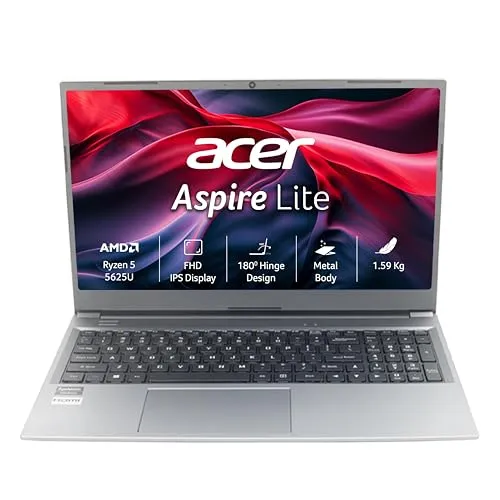
Acer Aspire Lite Ryzen 5

The Acer Aspire Lite Ryzen 5 is one of the best overall choices for DU SOL students because it balances performance, pricing, and portability extremely well.

Key Specifications

  • AMD Ryzen 5 5625U
  • 16GB RAM
  • 512GB SSD
  • Full HD Display
  • Metal Body
  • Lightweight Design

Why It Is Good for DU SOL Students

DU SOL students often keep multiple things open together:

  • Chrome tabs
  • PDFs
  • WhatsApp Web
  • YouTube lectures
  • Assignments
  • Google Docs

This is where 16GB RAM becomes very useful.

The laptop remains smooth even during multitasking.

The lightweight body also helps students who:

  • travel daily
  • study in libraries
  • attend coaching
  • carry laptops frequently

Best For

  • B.Com students
  • BA students
  • CA Foundation students
  • General multitasking
  • Online classes

Pros

  • Excellent value for money
  • Smooth multitasking
  • Lightweight and portable
  • Fast SSD performance

Cons

  • Average speakers
  • Not ideal for heavy gaming

Best Budget Laptop for DU SOL Students

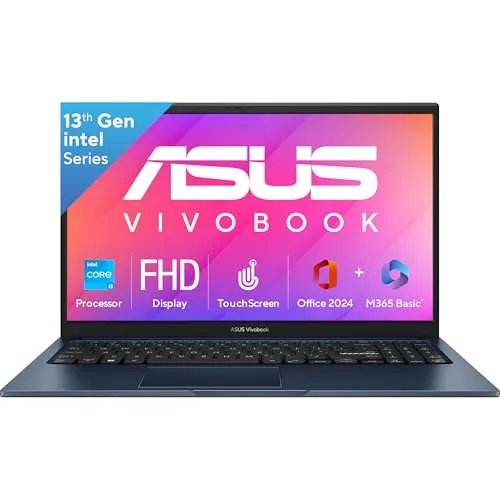
ASUS Vivobook 15 Intel i3

Students with tighter budgets should consider the ASUS Vivobook 15 because it handles everyday student work comfortably without becoming too expensive.

Key Specifications

  • Intel Core i3 13th Gen
  • 12GB RAM
  • 512GB SSD
  • Full HD Display
  • Microsoft Office Included

Why Students Like It

Most students mainly use laptops for:

  • assignments
  • lectures
  • browsing
  • PDFs
  • presentations

This laptop handles those tasks smoothly.

The included Microsoft Office is also useful because many students otherwise spend extra money later.

Best For

  • Commerce students
  • Arts students
  • Everyday study usage
  • Budget-focused buyers

Pros

  • Balanced performance
  • SSD keeps system fast
  • Office included
  • Good for daily student work

Cons

  • Not suitable for heavy editing
  • Display brightness could be better outdoors

Best Performance Laptop for Students Who Multitask Heavily

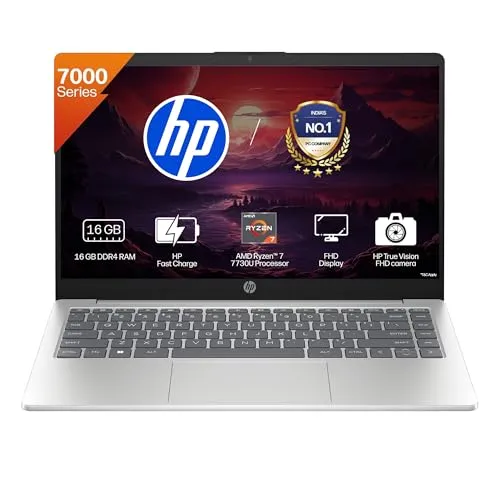
HP 14 Ryzen 7

Some students use demanding applications or multitask heavily throughout the day.

For them, the HP 14 Ryzen 7 is a strong option.

Key Specifications

  • AMD Ryzen 7 7730U
  • 16GB RAM
  • 512GB SSD
  • Backlit Keyboard
  • Privacy Shutter
  • Lightweight 14-inch Design

Why It Stands Out

This laptop is ideal for students who:

  • attend online classes
  • learn editing
  • use Excel heavily
  • do internships
  • multitask constantly

The portability is another major advantage because many gaming laptops become uncomfortable to carry daily.

Best For

  • Internship work
  • Productivity
  • Excel and office work
  • Skill learning
  • Students wanting long-term performance

Pros

  • Excellent multitasking performance
  • Lightweight design
  • Good battery efficiency
  • Premium feel

Cons

  • Smaller display may not suit everyone
  • More expensive than budget laptops

Best Gaming and Editing Laptop for Students

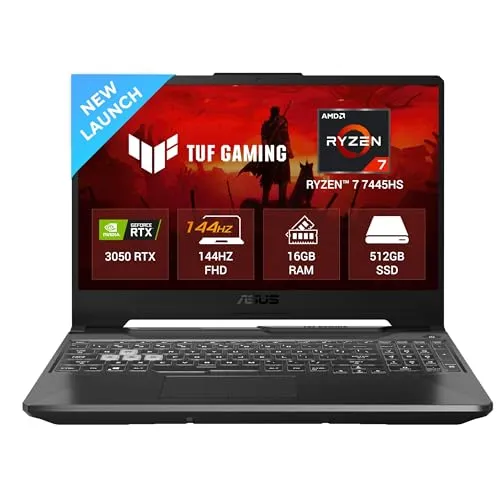
ASUS TUF A15

Many students buy gaming laptops without actually needing them.

But if you genuinely:

  • edit videos
  • use creative software
  • play games
  • learn design
  • use heavier applications

then the ASUS TUF A15 becomes a good option.

Key Specifications

  • AMD Ryzen 7
  • RTX 3050 Graphics
  • 16GB DDR5 RAM
  • 512GB SSD
  • 144Hz Display

Why It Is Powerful

The dedicated RTX graphics help significantly in:

  • gaming
  • editing
  • rendering
  • creative workloads

The upgradeable RAM is another advantage for long-term usage.

Best For

  • Gaming
  • Video editing
  • Design students
  • Creative workloads

Pros

  • Strong overall performance
  • Upgrade-friendly
  • High refresh rate display
  • Powerful processor

Cons

  • Heavy compared to normal laptops
  • Lower battery life
  • Overkill for basic student use

What DU SOL Students Should Actually Look for in a Laptop

1. SSD Storage Is Mandatory in 2026

Avoid HDD laptops.

SSD storage improves:

  • speed
  • multitasking
  • app loading
  • overall smoothness

A 512GB SSD is the ideal minimum.


2. 16GB RAM Is Better for Long-Term Usage

Many students buy 8GB RAM laptops and regret it later.

DU SOL students often keep:

  • lectures
  • PDFs
  • Chrome tabs
  • Office apps
  • WhatsApp
  • YouTube

open together.

Low RAM quickly creates lag.

If your budget allows it, 16GB RAM is the safest option.


3. Don’t Buy Heavy Gaming Laptops Without Reason

This is one of the biggest mistakes students make.

Gaming laptops usually have:

  • worse battery life
  • more weight
  • louder fans
  • higher pricing

If your work is mainly:

  • lectures
  • assignments
  • browsing
  • online classes

then normal productivity laptops are smarter.


4. Battery Life Matters More Than Students Think

Students often study:

  • in libraries
  • during travel
  • at coaching
  • in cafes
  • during power cuts

Good battery backup becomes important quickly.


Which Laptop Should Most DU SOL Students Buy?

Choose Acer Aspire Lite Ryzen 5 If:

  • You want the best overall value
  • You multitask regularly
  • You want smooth long-term performance

Choose ASUS Vivobook 15 If:

  • Your budget is tighter
  • Your usage is mostly study-related
  • You want Microsoft Office included

Choose HP 14 Ryzen 7 If:

  • You want premium portability
  • You multitask heavily
  • You want stronger long-term performance

Choose ASUS TUF A15 If:

  • You genuinely need gaming or editing power
  • You use creative software
  • You want high-performance hardware

Final Verdict

For most DU SOL students, the Acer Aspire Lite Ryzen 5 offers the best balance of:

  • performance
  • RAM
  • portability
  • SSD speed
  • long-term value

Students focused mainly on portability may prefer the HP 14 Ryzen 7, while gaming and editing users should look toward the ASUS TUF A15.

The best laptop for students is not the most expensive one.

It is the laptop that handles daily student work smoothly without creating unnecessary financial pressure.

Enjoyed this? Share it with others

Stay Ahead of DU SOL Notices & Deadlines
Instead of checking multiple websites and groups daily, get important DU SOL updates directly on WhatsApp.
Join WhatsApp Channel
S

As a current B.Com (Hons) student at DU SOL and an active Chartered Accountancy (CA) aspirant, I understand the exact pressure, syllabus confusion, and administrative hurdles students face daily. TheSushant.in was built to provide first-hand, stress-tested guidance. Every DU SOL update, exam strategy, and CA study note shared here comes directly from my personal academic journey, official notifications, and real-time student experience. No generic advice: practical, student-to-student blueprints to help you clear your exams and level up.

Written & Reviewed by Author

Get DU SOL notice alerts on WhatsApp
Get Updates
Scroll to Top