

- Before Buying Anything, Ask Yourself One Question
- If You Mostly Study, Write Assignments and Attend Online Classes
- Where an iPad Completely Beats a MacBook
- Students Preparing for Competitive Exams Benefit Even More
- Can an iPad Replace a Laptop?
- Why File Management Still Matters
- The Best Setup for Most Students Isn’t One Device
- MacBook becomes your:
- iPad becomes your:
- The Hidden Productivity Advantage Nobody Talks About
- Universal Clipboard
- AirDrop
- Handoff
- Sidecar
- Which Students Should Buy Only a MacBook?
- Which Students Should Buy Only an iPad?
- Which Students Should Upgrade Beyond an Entry-Level MacBook?
- Computer Science
- Video Editing
- Graphic Design
- 3D Design and Animation
- Think About Earning Money Too
- Don’t Buy More Power Than You’ll Ever Use
- So… MacBook, iPad or Both?
- Buy only a MacBook if:
- Buy only an iPad if:
- Buy both if:
- Final Thoughts
- Buy iPad
- Buy Macbook
- FAQ
- Is a MacBook better than an iPad for college?
- Can I survive college with only an iPad?
- Is buying both a MacBook and iPad worth it?
- Which Apple device is best for engineering or computer science students?
- Which Apple device is best for medical, nursing, or CA students?
Buying a laptop for college isn’t just about choosing Apple over Windows anymore.
The bigger question students ask in 2026 is:
Should I buy a MacBook?
Should I buy an iPad?
Or should I somehow manage to buy both?
It’s an expensive decision.
A wrong purchase could leave you carrying an expensive device that doesn’t actually fit your daily college life.
This guide isn’t another generic comparison listing specifications.
Instead, we’ll look at how students actually study, attend lectures, complete assignments, prepare for exams, edit videos, write code, and even earn money online to determine which Apple device makes the most sense.
| Product | Title | Price | Rating | Buy |
|---|---|---|---|---|
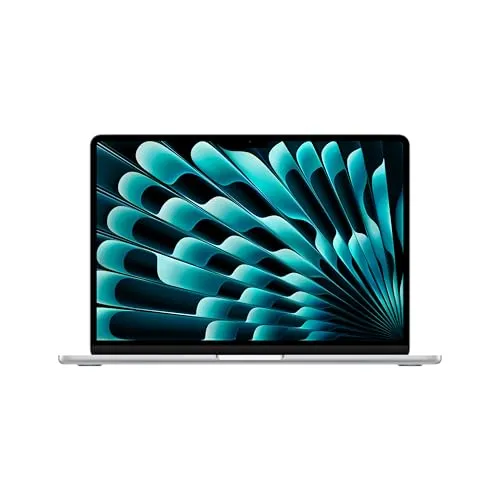 | Apple MacBook Air 13-inch, Apple M3 chip Best Pick | ₹147990 | ★ 4.2/5 | Check Price |
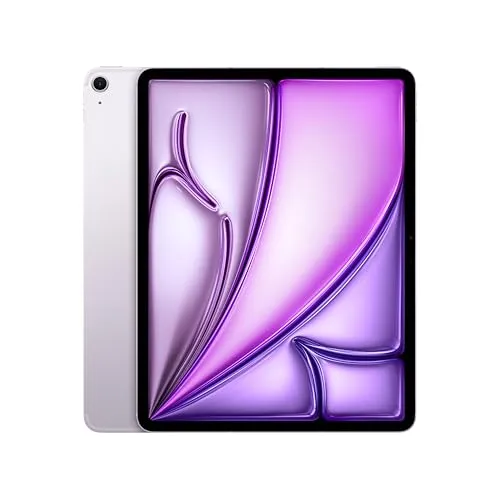 | Apple iPad Air 13? with M3 chip | ₹94900 | ★ 5.0/5 | Check Price |
Before Buying Anything, Ask Yourself One Question
Don’t ask:
“Which device is better?”
Ask:
“What will I actually spend 80% of my time doing?”
Because different students use their devices differently.
A nursing student doesn’t need the same setup as a computer science student.
A UPSC aspirant doesn’t work like a graphic designer.
A content creator doesn’t use technology like a B.Com student.
Once you understand your workflow, choosing becomes much easier.


If You Mostly Study, Write Assignments and Attend Online Classes
A MacBook is usually the better investment.
Here’s why.
Every college eventually expects students to submit:
- Research papers
- PowerPoint presentations
- Excel sheets
- PDFs
- Reports
- Projects
- Internship documents
- Emails
- Online forms
All of these are significantly easier on macOS.
The desktop versions of Microsoft Office, Google Docs, PDF editors, browsers and productivity software simply provide a smoother experience than their tablet counterparts.
If your college work mostly revolves around documents and multitasking, a MacBook becomes your primary work machine.
Where an iPad Completely Beats a MacBook
This is where many students underestimate the iPad.
During lectures, typing isn’t always the best way to learn.
Imagine your chemistry professor drawing molecular structures.
Or your mathematics teacher solving equations.
Or your biology professor explaining diagrams.
Typing these quickly becomes frustrating.
An iPad with Apple Pencil feels almost like carrying an unlimited notebook.
You can:
- Write naturally
- Draw diagrams
- Highlight PDFs
- Annotate lecture slides
- Solve numerical questions
- Create handwritten revision notes
For visual learners, this is incredibly valuable.
Students Preparing for Competitive Exams Benefit Even More
If you’re preparing for:
- CA
- UPSC
- SSC
- Banking
- NEET PG
- CAT
- GATE
An iPad becomes an excellent revision machine.
You can keep:
- Notes
- Previous year papers
- PDFs
- Mock tests
- Mind maps
all in one place.
Instead of carrying five notebooks, everything stays digitally searchable.
Can an iPad Replace a Laptop?
This is probably the most searched question.
The answer isn’t simply yes or no.
It depends.
An iPad can comfortably replace a laptop if you mostly:
- Read PDFs
- Watch lectures
- Attend online classes
- Take notes
- Browse websites
- Reply to emails
- Create basic presentations
- Write assignments
However, limitations appear when your work becomes more technical.
Examples include:
- Programming projects
- Advanced Excel work
- Multiple browser windows
- Professional editing software
- Development tools
- Virtual machines
- Engineering software
At that point, you’ll start wishing you had a proper desktop operating system.
Why File Management Still Matters
Many students ignore this before purchasing.
Eventually you’ll have:
- Semester folders
- Assignment folders
- Internship documents
- Resume versions
- Project files
- Photos
- Videos
- PDFs
Managing hundreds of files is simply easier on macOS.
The Finder app offers much more flexibility compared to iPadOS.
This may not matter in your first month of college.
It definitely matters in your third year.
The Best Setup for Most Students Isn’t One Device
For many students, the smartest combination is:
MacBook + Basic iPad + Apple Pencil
Each device performs a different role.
MacBook becomes your:
- Assignment machine
- Presentation machine
- Research machine
- Coding device
- Video editing computer
- Internship workstation
iPad becomes your:
- Digital notebook
- PDF reader
- Lecture companion
- Handwritten revision book
- Second display
- Quick study device
Instead of trying to force one product to do everything, each device specializes.
The Hidden Productivity Advantage Nobody Talks About
One underrated Apple feature is ecosystem integration.
For students this saves surprising amounts of time.
Examples include:
Universal Clipboard
Copy text on your iPhone.
Paste it instantly on your MacBook.
AirDrop
Transfer:
- Notes
- PDFs
- Photos
- Videos
- Assignments
without cables.
Handoff
Start writing an email on your phone.
Continue it on your MacBook.
Sidecar
Turn your iPad into a second display for your MacBook.
While researching, you can keep:
Left screen:
Research paper
Right screen:
Assignment
This reduces constant tab switching.
Which Students Should Buy Only a MacBook?
A MacBook alone is enough if you study:
- B.Com
- BBA
- BA
- Law
- MBA
- Journalism
- Economics
- Commerce
- Finance
- Most office-oriented courses
Your work primarily revolves around productivity software.
Which Students Should Buy Only an iPad?
Buying only an iPad makes sense if:
- Your budget allows a higher-end iPad.
- You mostly consume study material.
- You prefer handwritten notes.
- You travel frequently.
- You don’t need desktop software.
However, buy a keyboard if this will be your only device.
Without one, writing long assignments becomes uncomfortable.
Which Students Should Upgrade Beyond an Entry-Level MacBook?
Some courses demand more computing power.
Consider a more powerful MacBook if you’re studying:
Computer Science
You’ll likely use:
- IDEs
- Docker
- Databases
- AI tools
- Virtual machines
Video Editing
Projects involving:
- Premiere Pro
- Final Cut Pro
- DaVinci Resolve
benefit from faster processors and additional memory.
Graphic Design
Working with:
- Photoshop
- Illustrator
- Lightroom
requires stronger hardware.
3D Design and Animation
Applications like:
- Blender
- Maya
- Cinema4D
perform much better on higher-end systems.
Think About Earning Money Too
Many students buy devices only for college.
A better question is:
Can this device also help me earn?
For example:
A MacBook allows you to learn:
- Freelance video editing
- Graphic design
- Web development
- Content writing
- App development
- UI/UX design
- Digital marketing
Meanwhile, an iPad is excellent for:
- Digital note selling
- Handwritten study material
- Digital art
- PDF annotation
- Online tutoring
- Content planning
Your purchase shouldn’t just help you pass exams.
It should also help you build skills that generate income.
Don’t Buy More Power Than You’ll Ever Use
Many students spend extra money simply because someone online recommended the “Pro” model.
That’s often unnecessary.
If all your daily work includes:
- Chrome
- Word
- PowerPoint
- YouTube
- PDFs
- Online classes
buying a professional-grade machine may not improve your experience enough to justify the additional cost.
Spend according to your actual workload—not marketing.
So… MacBook, iPad or Both?
Here’s the practical recommendation.
Buy only a MacBook if:
- Budget is limited.
- You need desktop software.
- You write lots of assignments.
- Productivity is your priority.
Buy only an iPad if:
- Note-taking is your biggest priority.
- You mainly consume study material.
- You don’t rely on desktop applications.
Buy both if:
- Budget allows.
- You want the best long-term college setup.
- You want to balance productivity with handwritten learning.
- You plan to use these devices throughout your degree.
Final Thoughts
There isn’t a single “best” Apple device for every student.
The right purchase depends entirely on how you study, what your course demands, and whether you also plan to build skills outside the classroom.
A MacBook helps you create.
An iPad helps you learn.
Together, they create one of the most productive study ecosystems available—but only if your budget supports it.
If you have to choose just one, don’t buy based on trends or social media. Buy the device that solves the problems you’ll face every day for the next three to four years of college.
Buy iPad
Buy Macbook
FAQ
Is a MacBook better than an iPad for college?
Yes, A MacBook offers better multitasking, desktop software support, file management, and productivity for assignments, projects, and research.
Can I survive college with only an iPad?
Yes, if your work mainly involves note-taking, reading PDFs, attending lectures, and basic document editing. Technical courses may still require a laptop.
Is buying both a MacBook and iPad worth it?
If your budget allows, the combination offers one of the best study setups. The MacBook handles productivity while the iPad excels at handwritten notes, PDF annotation, and lecture work.
Which Apple device is best for engineering or computer science students?
A MacBook is better choice because engineering and computer science students often need desktop applications, programming tools, and better multitasking.
Which Apple device is best for medical, nursing, or CA students?
Students who spend a lot of time making handwritten notes often benefit from an iPad with Apple Pencil, while a MacBook remains useful for assignments and research. The ideal choice depends on budget and workload.
Sushant Kumar
Founder
As a current B.Com (Hons) student at DU SOL and an active Chartered Accountancy (CA) aspirant, I understand the exact pressure, syllabus confusion, and administrative hurdles students face daily. TheSushant.in was built to provide first-hand, stress-tested guidance. Every DU SOL update, exam strategy, and CA study note shared here comes directly from my personal academic journey, official notifications, and real-time student experience. No generic advice: practical, student-to-student blueprints to help you clear your exams and level up.


