

- Design: Light Enough to Carry Every Day
- Display: One of the Biggest Reasons to Buy This Laptop
- Performance: Easily Handles Everyday Student Work
- Can Finance Students Run Tally?
- Coding and Programming Experience
- AI Features That Are Actually Useful
- Windows Recall
- Click to Do
- Studio Effects
- Battery Life Is Excellent
- Keyboard and Trackpad
- Webcam for Online Classes
- What About Gaming?
- Things You Should Know Before Buying
- No HDMI Port
- No SD Card Slot
- ARM Software Compatibility
- Who Should Buy the HP OmniBook 5?
- Who Should Skip It?
- Buy the HP OmniBook 5
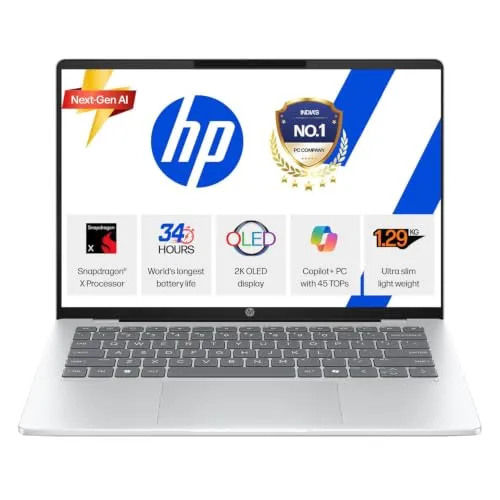
Buying a laptop has become more confusing than ever. Some laptops focus on gaming, some focus on performance, while newer AI laptops promise better battery life and smarter features. The HP OmniBook 5 belongs to this new generation of AI PCs powered by Qualcomm’s Snapdragon X processor.
After looking at its specifications, performance, software compatibility, battery life, display quality and day-to-day usability, one thing becomes clear:
The HP OmniBook 5 is one of the strongest Windows laptops for students under the ₹80,000 price range, provided your workload matches what it is designed for.
It is not a gaming laptop. It is not meant for heavy 3D rendering. But for studying, coding, office work, online classes, programming, research, presentations, note-taking, light editing and content creation, it performs exceptionally well.
Here’s everything students should know before buying it.
Design: Light Enough to Carry Every Day
One of the first things you’ll notice is how portable the laptop feels.
At roughly 1.3 kg, it is easy to carry between classes, libraries or offices without becoming uncomfortable after a full day.
The aluminium lid gives it a premium appearance while the polycarbonate body helps keep the weight low. The hinge is sturdy, opens with one hand and doesn’t wobble much while typing.
For students who travel daily, portability matters just as much as performance, and HP has done a good job here.
Display: One of the Biggest Reasons to Buy This Laptop

If there is one feature that immediately stands out, it is the display.
The HP OmniBook 5 comes with a 14-inch OLED display using a 16:10 aspect ratio.
Compared to traditional LCD panels, OLED offers:
- Much deeper blacks
- Better contrast
- More vibrant colours
- Excellent movie watching experience
- Comfortable reading experience
The 16:10 aspect ratio also gives more vertical workspace than a normal 16:9 display.
That means:
- More lines of code visible
- Larger Excel sheets
- Less scrolling while reading PDFs
- Better multitasking
If you spend hours reading study material, writing assignments or browsing research papers, this display alone makes the laptop feel premium.
Performance: Easily Handles Everyday Student Work
The laptop is powered by Qualcomm’s Snapdragon X processor, paired with:
- 16 GB LPDDR5X RAM
- 512 GB SSD
For everyday student workloads, this hardware is more than sufficient.
It comfortably handles:
- 20+ Chrome tabs
- Microsoft Office
- Google Docs
- Zoom or Google Meet
- VS Code
- Photoshop
- Spotify
- PDF readers
- YouTube
Benchmark scores are also respectable for this price segment, and unlike many Windows laptops, performance remains largely consistent even when running on battery power.
That means you don’t have to stay plugged in to get good performance during college hours.
Can Finance Students Run Tally?
Yes.
One question many commerce students ask is whether Tally works on Snapdragon laptops.
Although Tally does not currently have a native ARM version, it runs through Microsoft’s Prism emulation layer. For normal accounting work, voucher entries and learning purposes, it works well.
Students preparing for CA, CS, CMA or B.Com can comfortably use Tally alongside Excel and other office applications.
Coding and Programming Experience
For computer science and engineering students, software compatibility is no longer the concern it once was.
Native ARM support is already available for many popular development tools, including:
- Visual Studio Code
- Git
- Python
- Node.js
- Docker (supported versions)
- Android Studio (improving)
- GitHub Desktop
Programming, web development and app development work smoothly.
If your coursework mainly involves coding, this laptop is more than capable.
AI Features That Are Actually Useful
Unlike marketing buzzwords, some of the AI features here are genuinely practical.
Since the Snapdragon X includes a dedicated 45 TOPS NPU, several AI tasks run directly on the laptop instead of relying on cloud servers.
Useful features include:
Windows Recall
Recall lets you search through your past activity by taking encrypted local snapshots of your screen.
Forgot where you saw an article?
Simply search for it instead of opening browser history manually.
Everything remains stored locally and access requires Windows authentication.
Click to Do
Students watching recorded lectures can quickly copy text, formulas or diagrams directly from videos without manually typing everything.
Studio Effects
During online classes or interviews, Windows can automatically provide:
- Background blur
- Auto framing
- Portrait lighting
- Eye contact adjustments
These features make video calls look significantly better without additional software.
Battery Life Is Excellent
Battery life is arguably the strongest feature of the HP OmniBook 5.
ARM processors consume significantly less power compared to many traditional x86 laptops.
In practical student usage involving browsing, note-taking, YouTube, Office apps and coding, this laptop can comfortably last an entire college day.
HP also claims up to 34 hours of local video playback under ideal conditions, although real-world usage will naturally be lower.
Fast charging is another advantage.
The included USB Type-C charger can recharge the battery to around 50% in approximately 30 minutes.
Keyboard and Trackpad
Students often spend several hours typing assignments or programming.
Fortunately, the keyboard is comfortable.
It offers:
- Good key travel
- Backlit keys
- Quiet typing experience
The precision trackpad also supports Windows gestures smoothly.
For most users, there is no immediate need for an external mouse.
Webcam for Online Classes
The laptop includes a 1080p IR webcam.
Video quality is noticeably better than many older Windows laptops.
The infrared camera also supports Windows Hello facial recognition for quick logins.
A physical privacy shutter adds extra security when the camera isn’t in use.
What About Gaming?
This is where expectations need to be realistic.
The HP OmniBook 5 is not designed as a gaming laptop.
Since it relies on the integrated Adreno GPU, it can comfortably handle:
- Minecraft
- Valorant (lower settings)
- Rocket League
- Casual indie games
However, it is not suitable for demanding AAA games like:
- Cyberpunk 2077
- Black Myth: Wukong
- Alan Wake 2
Students looking primarily for gaming should consider laptops with dedicated NVIDIA RTX graphics instead.
Things You Should Know Before Buying
No laptop is perfect.
Here are a few limitations worth considering.
No HDMI Port
If you frequently connect projectors or external monitors, you’ll need a USB-C adapter.
No SD Card Slot
Photographers and content creators may require a separate card reader.
ARM Software Compatibility
Although compatibility has improved significantly, some specialised enterprise software may still perform better on Intel or AMD systems.
For most students, however, this is unlikely to become a major issue.
Who Should Buy the HP OmniBook 5?
This laptop is an excellent choice for:
- College students
- University students
- Engineering students
- BCA students
- B.Tech students
- MBA students
- Commerce students
- CA Foundation students
- Researchers
- Writers
- Programmers
- Content creators who mainly edit photos or short videos
Who Should Skip It?
You should look at other options if:
- Gaming is your primary purpose.
- You work with heavy 3D rendering software such as Blender.
- Your workflow depends on niche Windows applications that still lack ARM compatibility.
- You specifically need multiple legacy ports like HDMI and SD card slots.
Buy the HP OmniBook 5
The HP OmniBook 5 gets the fundamentals right.
It combines a lightweight design, one of the best OLED displays in its price segment, excellent battery life, a capable Snapdragon X processor, modern AI features and enough performance for almost every academic workload.
It is not trying to replace a gaming laptop or a workstation, and that’s perfectly fine. Instead, it focuses on what most students actually need: reliability, portability, long battery life and a great everyday experience.
If your budget is around ₹75,000–₹80,000 and your work involves studying, coding, presentations, research, office work, online classes or light creative tasks, the HP OmniBook 5 is one of the best Windows laptops you can buy in 2026.
It delivers where it matters most and avoids unnecessary compromises, making it a practical long-term investment for students rather than just another AI-branded laptop.
Sushant Kumar
Founder
As a current B.Com (Hons) student at DU SOL and an active Chartered Accountancy (CA) aspirant, I understand the exact pressure, syllabus confusion, and administrative hurdles students face daily. TheSushant.in was built to provide first-hand, stress-tested guidance. Every DU SOL update, exam strategy, and CA study note shared here comes directly from my personal academic journey, official notifications, and real-time student experience. No generic advice: practical, student-to-student blueprints to help you clear your exams and level up.

