

- What Students Should Look for Before Buying
- 1. Choose the Right Layout
- 2. Switch Type Matters More Than RGB
- 3. Wired vs Wireless
- Best Budget Mechanical Keyboards for Students (2026)
- 1. Keychron C3 Pro TKL
- Best Overall for Study & Coding
- Pros
- Cons
- 2. Royal Kludge RK84 Pro
- Best Wireless Keyboard for Clean Desk Setups
- Pros
- Cons
- 3. Redragon K668 / K552
- Best Budget Mechanical Keyboard
- Pros
- Cons
- 4. AULA F75 Gasket Mount
- Best Quiet Typing Experience
- Pros
- Cons
- 5. Logitech Pebble Keys 2 K380s
- Best Silent Portable Alternative
- Pros
- Cons
- Quick Comparison
- Final Verdict
If you’re spending hours every day attending online classes, writing assignments, coding projects, preparing presentations, or studying for exams, your laptop’s built-in keyboard can quickly become uncomfortable. Flat keys often lead to finger fatigue, inconsistent typing, and poor wrist posture during long sessions.
A good keyboard isn’t just a luxury—it can make studying more comfortable, improve typing accuracy, and help you maintain better posture over extended periods. For college students sharing dorm rooms, libraries, or study spaces, choosing a keyboard that’s comfortable without being excessively loud is equally important.
This guide focuses on keyboards that balance typing comfort, durability, compact desk-friendly designs, and quiet operation. Whether you’re a B.Tech student writing code, a commerce student preparing reports, a thesis writer, or simply building a cleaner study setup, these are among the best options worth considering.
What Students Should Look for Before Buying
Before choosing a keyboard, it’s worth understanding a few features that can significantly affect your daily experience.
1. Choose the Right Layout
TKL (80%)
A Tenkeyless keyboard removes the number pad while keeping navigation keys intact. It provides extra mouse space, making it an excellent choice for coding, studying, and everyday productivity.
75% Compact
A 75% layout compresses the keyboard further while retaining function keys and arrow keys. It creates a cleaner desk setup and is ideal for hostel rooms or small study tables.
Full-Size
A full-size keyboard includes a dedicated number pad. Students working frequently with Excel, accounting, finance, or large datasets may find this layout more convenient, though it occupies more desk space.
2. Switch Type Matters More Than RGB
Mechanical switches greatly influence typing feel and noise levels.
Red Linear Switches
- Smooth keystrokes
- Minimal resistance
- Generally quieter
- Excellent for long writing and coding sessions
Brown Tactile Switches
- Gentle tactile feedback
- Moderate sound
- Great balance for both typing and gaming
Blue Clicky Switches
Although satisfying to type on, they produce noticeable clicking sounds that may disturb roommates or library users. Most students are better served by red or brown switches.
3. Wired vs Wireless
Wired USB-C
- Zero charging
- Stable connection
- Ideal for desktop study setups
- No wireless latency
Bluetooth / Multi-Device Wireless
Perfect if you regularly switch between:
- Laptop
- Tablet
- Phone
Wireless keyboards also help reduce cable clutter and create a cleaner workspace.


Best Budget Mechanical Keyboards for Students (2026)
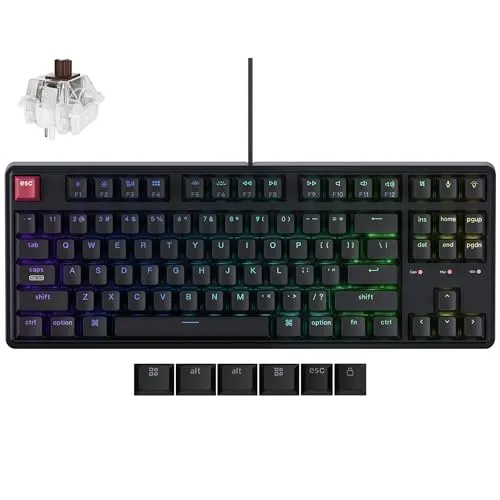
1. Keychron C3 Pro TKL
Best Overall for Study & Coding
The Keychron C3 Pro TKL strikes an excellent balance between typing comfort, programmability, and long-term reliability. Its tenkeyless layout provides more room for mouse movement without sacrificing essential navigation keys, making it especially comfortable for students who spend hours coding, writing assignments, or editing documents.
One of its standout advantages is support for QMK/VIA, allowing advanced users to remap keys, create shortcuts, and customize workflows without replacing the keyboard. Even if you never touch these features, it’s reassuring to know the keyboard can adapt as your needs evolve.
The red linear switches feel smooth during extended typing sessions, while the south-facing RGB design improves compatibility with custom keycaps for users interested in future upgrades.
Pros
- Comfortable for extended typing sessions
- Excellent typing consistency
- QMK/VIA programmable
- Compact yet familiar layout
- Solid build quality
Cons
- Wired only
- No hot-swappable switches
2. Royal Kludge RK84 Pro
Best Wireless Keyboard for Clean Desk Setups
Students frequently moving between lectures, hostel rooms, and home desks will appreciate the flexibility offered by the Royal Kludge RK84 Pro.
Its tri-mode connectivity lets you switch seamlessly between USB-C, Bluetooth, and 2.4GHz wireless connections. Multi-device support is especially useful if you work across a laptop, tablet, and smartphone throughout the day.
The aluminum frame adds a premium feel, while hot-swappable switches allow users to experiment with different switch types without replacing the entire keyboard. Its compact 75% layout retains dedicated arrow keys while minimizing desk footprint.
Pros
- Bluetooth, 2.4GHz, and wired connectivity
- Excellent desk aesthetics
- Hot-swappable switches
- Premium construction
- Compact without sacrificing productivity
Cons
- Learning curve for the compact layout
- Software customization isn’t as polished as some competitors
3. Redragon K668 / K552
Best Budget Mechanical Keyboard
For students entering the mechanical keyboard market for the first time, the Redragon K668 and K552 continue to be dependable choices.
Their sturdy ABS construction feels surprisingly durable, making them well-suited for daily college use. The keyboards have earned a reputation for withstanding years of regular typing without developing significant key wobble or structural issues.
Depending on your workspace, you can choose between full-size and tenkeyless layouts. This flexibility makes them suitable for both accounting students who rely on a number pad and programmers who prefer extra desk space.
Pros
- Excellent durability
- Reliable mechanical switches
- Multiple layout choices
- Strong value for first-time buyers
- Easy availability
Cons
- Less refined typing acoustics
- Basic software ecosystem
4. AULA F75 Gasket Mount
Best Quiet Typing Experience
If typing feel matters as much as performance, the AULA F75 stands out.
Its gasket-mounted design softens bottom-out impact, creating a noticeably cushioned typing experience compared to traditional tray-mounted keyboards. Combined with factory pre-lubed switches, keystrokes feel smoother while producing a more muted sound profile.
This makes the keyboard particularly suitable for late-night assignments, dissertation writing, and shared dorm rooms where excessive keyboard noise can become distracting.
Its 75% layout also leaves enough desk space for notebooks, tablets, and study materials.
Pros
- Soft, comfortable typing feel
- Quieter than many budget mechanical keyboards
- Smooth factory-lubed switches
- Modern compact layout
- Pleasant typing acoustics
Cons
- Slightly heavier than ultra-portable keyboards
- Limited availability in some regions
5. Logitech Pebble Keys 2 K380s
Best Silent Portable Alternative
Not every student wants a traditional mechanical keyboard.
The Logitech Pebble Keys 2 K380s offers an exceptionally quiet typing experience with a slim, lightweight design that’s easy to carry between classrooms, libraries, and cafés.
Its whisper-quiet keys are unlikely to disturb people nearby, making it one of the best options for shared study environments. Multi-device Bluetooth pairing allows quick switching between a laptop, tablet, and smartphone using dedicated shortcut keys.
While it doesn’t provide the deep travel or tactile feel of a mechanical keyboard, its portability and quiet operation make it a practical alternative for students who prioritize convenience.
Pros
- Extremely quiet typing
- Lightweight and travel-friendly
- Multi-device Bluetooth support
- Long battery life
- Comfortable for everyday productivity
Cons
- Not a mechanical keyboard
- Shorter key travel than mechanical alternatives
Quick Comparison
| Product | Title | Price | Rating | Buy |
|---|---|---|---|---|
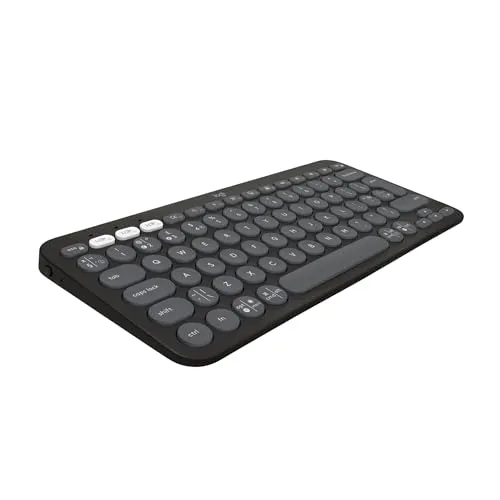 | Logitech Pebble Keys 2 K380s, Multi-Device Wireless Keyboard Best Pick | ₹3195 | ★ 3.9/5 | Check Price |
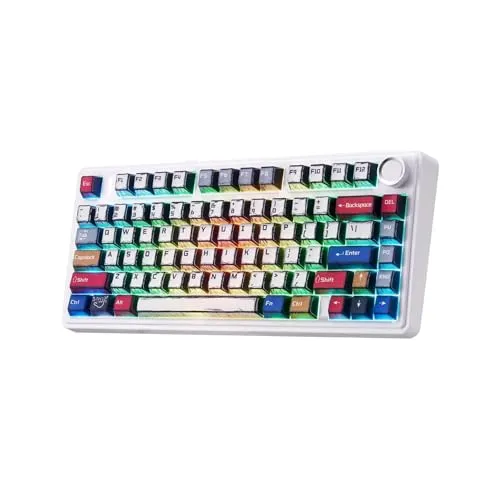 | Aula F75 Mechanical Keyboard, Wireless RGB Backlit Gaming Keyboard | ₹11892 | ★ 4.2/5 | Check Price |
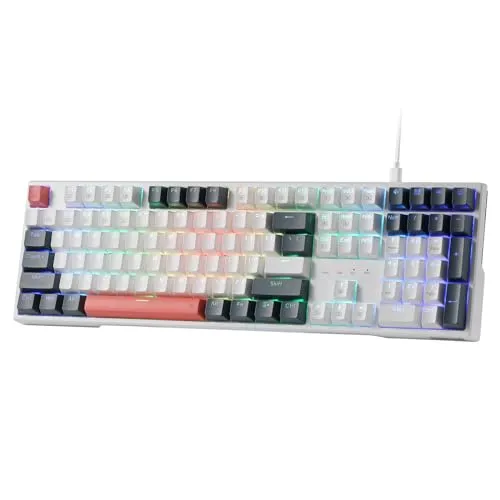 | Redragon K668 RGB Gaming Keyboard, Wired Mechanical Keyboard | ₹3990 | ★ 3.9/5 | Check Price |
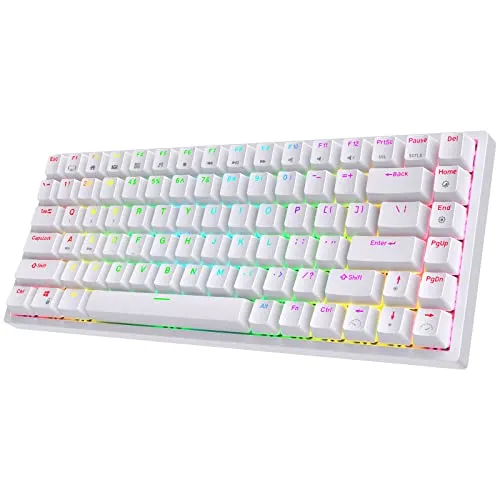 | ROYAL KLUDGE RK84 Pro Wireless RGB/USB-C Mechanical Keyboard | ₹13398 | ★ 4.0/5 | Check Price |
 | Keychron C3 Pro TKL Wired Mechanical Keyboard | ₹12804 | ★ 4.0/5 | Check Price |
| Keyboard | Form Factor | Switch Type | Wireless |
|---|---|---|---|
| Keychron C3 Pro TKL | TKL (80%) | Red Linear | ❌ |
| Royal Kludge RK84 Pro | 75% | Hot-Swappable Mechanical | ✅ |
| Redragon K668 / K552 | Full-Size / TKL | Mechanical | ❌ |
| AULA F75 | 75% | Pre-Lubed Mechanical | Varies |
| Logitech Pebble Keys 2 K380s | Compact | Quiet Scissor Switch | ✅ |
Final Verdict
If you want the most balanced keyboard for studying, programming, and long writing sessions, the Keychron C3 Pro TKL remains the strongest overall recommendation thanks to its excellent typing experience, programmable firmware, and compact layout.
Students who value wireless flexibility and a clean workspace should consider the Royal Kludge RK84 Pro, while the Redragon K668/K552 offers dependable durability for first-time mechanical keyboard buyers.
For quieter late-night typing, the AULA F75 delivers one of the most comfortable experiences in its category. If maximum portability and silent operation matter more than a mechanical feel, the Logitech Pebble Keys 2 K380s is an excellent companion for classrooms, libraries, and travel.
Ultimately, the best keyboard is the one that matches your study habits, workspace, and daily workflow. A thoughtful upgrade today can make every assignment, coding session, and research project noticeably more comfortable.
Sushant Kumar
Founder
As a current B.Com (Hons) student at DU SOL and an active Chartered Accountancy (CA) aspirant, I understand the exact pressure, syllabus confusion, and administrative hurdles students face daily. TheSushant.in was built to provide first-hand, stress-tested guidance. Every DU SOL update, exam strategy, and CA study note shared here comes directly from my personal academic journey, official notifications, and real-time student experience. No generic advice: practical, student-to-student blueprints to help you clear your exams and level up.


